TikTok Video Downloader
Paste a TikTok link to extract the media stream and save it as a file on your phone or computer.
Paste a URL to download
Paste a video/playlist URL using iStack's extractor.
Quick check — then you can download
Finding streams…
Usually a few seconds
Note: Only download content you have the rights/permission to download. Some platforms rotate signed URLs; if a download fails, paste the URL again and click Download.
Paste one video URL per line (2–100 URLs on Pro or Creator). Start Free Trial to unlock batch mode.
Supported sites:


and 1000+ more — including YouTube Reels, Shorts & Stories, Vimeo, Dailymotion, and regional hosts.
Grab every image & video on the page — in one shot
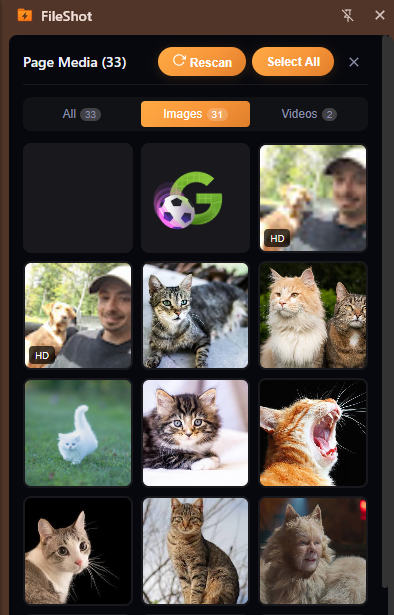
Skip copy-paste when a page is full of media. The iStack extension scans the open tab for images and videos, then lets you download everything to your computer or upload to iStack for an instant shareable link — encrypted, with optional expiry.
 Add to Chrome
 Firefox
Learn about the iStack extension — Page Media, screenshots, paste-URL download, and encrypted sharing.
- All page media at once
- Download or share via iStack
- Free — no ads injected
Need to share the file securely afterward? iStack encrypts uploads in your browser before they leave your device.
Paste a public Instagram link and save the video directly to your device.
We do not sell a history of URLs you analyze. Free tier may show ads; Pro is ad-free.
Files go straight to your device. Optionally upload to iStack for encrypted sharing.
How the TikTok Video Downloader Works on iStack
Paste a public video URL into the field above and iStack analyzes the page to find available video streams. Choose format and quality, then save directly to your phone or computer — no app install required. This TikTok video downloader is built for TikTok share links and public video pages.
Supported links include public pages that expose embeddable or progressive media. iStack detects the host automatically and lists available qualities and formats before you download. Open the TikTok in a browser, copy the URL from the address bar, then paste here. Region-locked or private clips will not extract.
iStack runs the same class of extraction pipeline used by serious online downloaders: resolve the page, probe formats, then deliver a real file — not a fake “convert” interstitial. You stay in control of quality, container, and whether you want video or audio-only.
Privacy-First Downloading
Unlike many online downloaders, iStack does not inject malware, push unwanted extensions, or sell a dossier of which URLs you analyze. Free users may see sponsored placements; upgraded plans are ad-free when offered. Processing runs on secure servers for your session.
Copy the URL from the address bar (not a share-sheet preview). Private or login-only posts usually cannot be extracted. After downloading, keep files on your own device and follow the rules of the platform you downloaded from.
We design this TikTok video downloader for people who already know the link they want. There is no forced desktop installer, no “enable notifications” trap, and no bait-and-switch to a different product mid-download. The tool UI is the product: paste, analyze, choose, save.
TikTok Video Downloader Download Guide
Use this page when you searched for “TikTok video downloader” and need a fast browser-based way to save video. Common tip: Open the TikTok in a browser, copy the URL from the address bar, then paste here. Region-locked or private clips will not extract.
- TikTok Video Downloader — Paste any public link and save video to your device. Free, fast, no account required when the media is publicly accessible.
- Related iStack tools — Video Downloader, Free Video Downloader, Download Video From Link.
- 1000+ other sites — The same engine handles YouTube, TikTok, Instagram, Facebook, X/Twitter, Reddit, Vimeo, Twitch, and hundreds more hosts through modern extraction.
- Quality control — After analysis, compare progressive MP4 options against adaptive streams. HD is only listed when the origin actually publishes it.
- Audio-only — When you only need the soundtrack, pick an audio format from the results instead of re-encoding a full video file locally.
If you land here from a specific host keyword, stay on this branded URL — each iStack landing is written for a distinct search intent, with its own title, canonical, and FAQ. Cross-links below keep you inside istack.site so you can jump to sibling tools without bouncing to another brand.
When a download fails
Most failures are source-side: private posts, geo blocks, expired stories, or pages that never exposed a media URL. Retry with the canonical watch URL, disable VPN only if the host blocks datacenter IPs inconsistently, and avoid pasted text that includes tracking junk after the video id. iStack will surface a clear error instead of a fake progress bar.
Large files and busy peaks can take longer. Leave the tab open until the save finishes. If the host rate-limits anonymous fetch, wait a minute and try once more rather than spamming the button.
Guides on iStack
More TikTok video downloader landings on this site (same engine, unique SEO pages):
- Video Downloader — Paste Link, Save MP4 Online
- Free Video Downloader — No Watermark, Browser-Based
- Download Video From Link — URL to MP4 in Seconds
- URL Video Downloader — Paste Link, Save File
- YouTube Video Downloader — Save YouTube to MP4
- TikTok Video Downloader — Save TikTok Without Watermark When Available
- Instagram Video Downloader — Reels & Posts From Link
- Facebook Video Downloader — Save FB Video From URL
- Twitter / X Video Downloader — Save X Videos From Link
- Reddit Video Downloader — Save Reddit Videos Online
- HD Video Downloader — High Quality Online Saves
- MP4 Video Downloader — Save Links as MP4
Frequently Asked Questions
Is this TikTok video downloader free on iStack?
Yes. iStack's TikTok video downloader is free within the shared tools quota. No watermarks on downloaded files. Sign in for higher limits when you need them; paid tiers unlock batch and larger files.
What formats can I save?
After analysis, iStack lists detected streams — typically MP4, WEBM, and audio-only options when the host exposes them. Pick the quality that fits your device.
Do you store my TikTok video downloader links?
No persistent URL history is kept after your session. Extraction runs for your download, then you keep the file on your device.
Why did my URL fail to analyze?
Private, login-walled, geo-blocked, or expired links cannot be fetched. Use the direct page URL from your browser address bar, not a shortened redirect.
Is it legal to use a TikTok video downloader?
Only download content you own or have permission to save. Respect platform terms and creator rights. iStack is for legitimate personal use.
Can I batch-download multiple links?
Higher tiers can paste multiple URLs in the batch panel when enabled. Free users typically download one link at a time. Playlist URLs auto-detect when the host supports them.
Copyright owners: contact abuse@istack.site for DMCA notices and URL blocking requests.